
Local video review
Open a folder, navigate through the collection and mark videos as reviewed or ignored without sending them online.
From raw video to an organized record, with local processing and full control of your files.
iNat TrailCam helps people who need to review many wildlife videos, find useful records, capture the best frames, read camera date and time, complete observation information and save an organized local package.
The main workflow runs locally on the user’s computer. Videos do not need to be uploaded to an external analysis service.
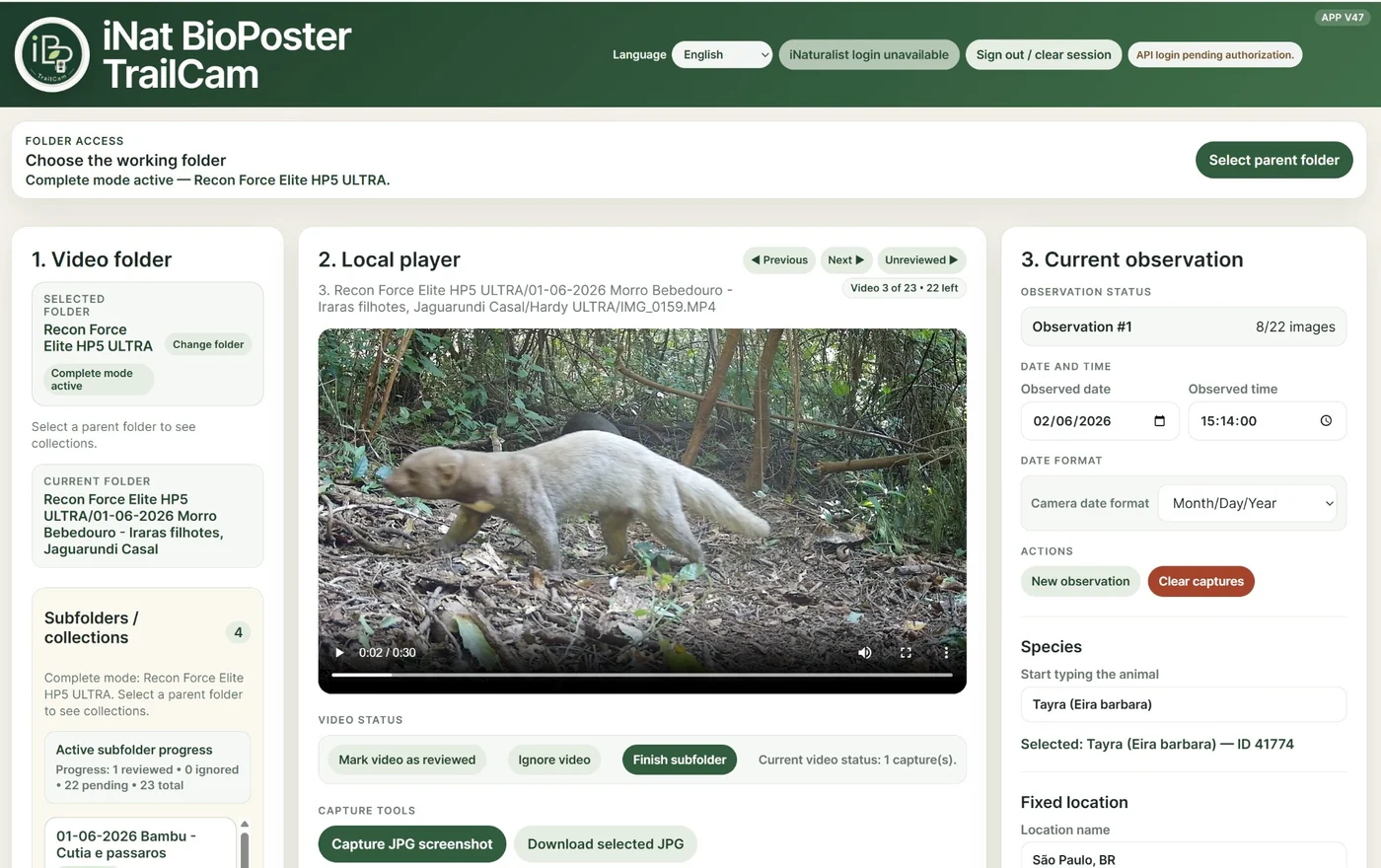
The most useful tools are brought together in a clear workflow for trail camera records.
Open a folder, navigate through the collection and mark videos as reviewed or ignored without sending them online.
Move frame by frame or about half a second at a time to select the clearest moment and save one or more JPG images.
Multiple OCR strategies help read the camera overlay. Results can always be reviewed and corrected by the user.
Search compatible taxa, places, projects and observation fields through the public iNaturalist API.
Save JPG images together with observation information, JSON, CSV and a reference to the source video.
Each JPG can preserve its own date, time, species, location, description, credits and source-video information.
Unusable videos are moved to a separate discard folder instead of being immediately deleted, with checks before the original is removed.
A recently moved video can be restored to its original folder and returned to its previous position in the review queue.
Load a local collection of trail camera videos.
Navigate, review, ignore or separate unusable records.
Choose precise moments and create one or more JPGs.
Review OCR and add species, location, projects and notes.
Create an organized package for archiving or later publication.
Every capture runs OCR. The first capture can fill the main observation date and time, while later captures keep their own recognized values in their JPG metadata. When the reading is uncertain, the app does not invent a result: the user can review, correct or continue manually.
The Move to discard action copies and validates the file before removing the original. Duplicate names are handled safely, the discard folder is excluded from future scans, and Undo provides a quick way to correct a mistaken decision.
Videos, frame captures, OCR, metadata and observation packages are processed locally. This is useful for sensitive wildlife records, private properties, limited internet connections and large collections. The main workflow does not require paid artificial-intelligence services.
The interface is available in Portuguese, English, Spanish and German. Chromium-based browsers such as Google Chrome and Microsoft Edge normally offer the best compatibility with direct folder access and local file organization.
iNat TrailCam currently focuses on reviewing, preparing, organizing and saving records locally. Direct iNaturalist login and automatic publication are not active yet. Future integration is planned after the software reaches a more advanced stage.
Comments from trail camera users, naturalists, researchers and conservation teams help guide the project’s development.